
Curbside Field
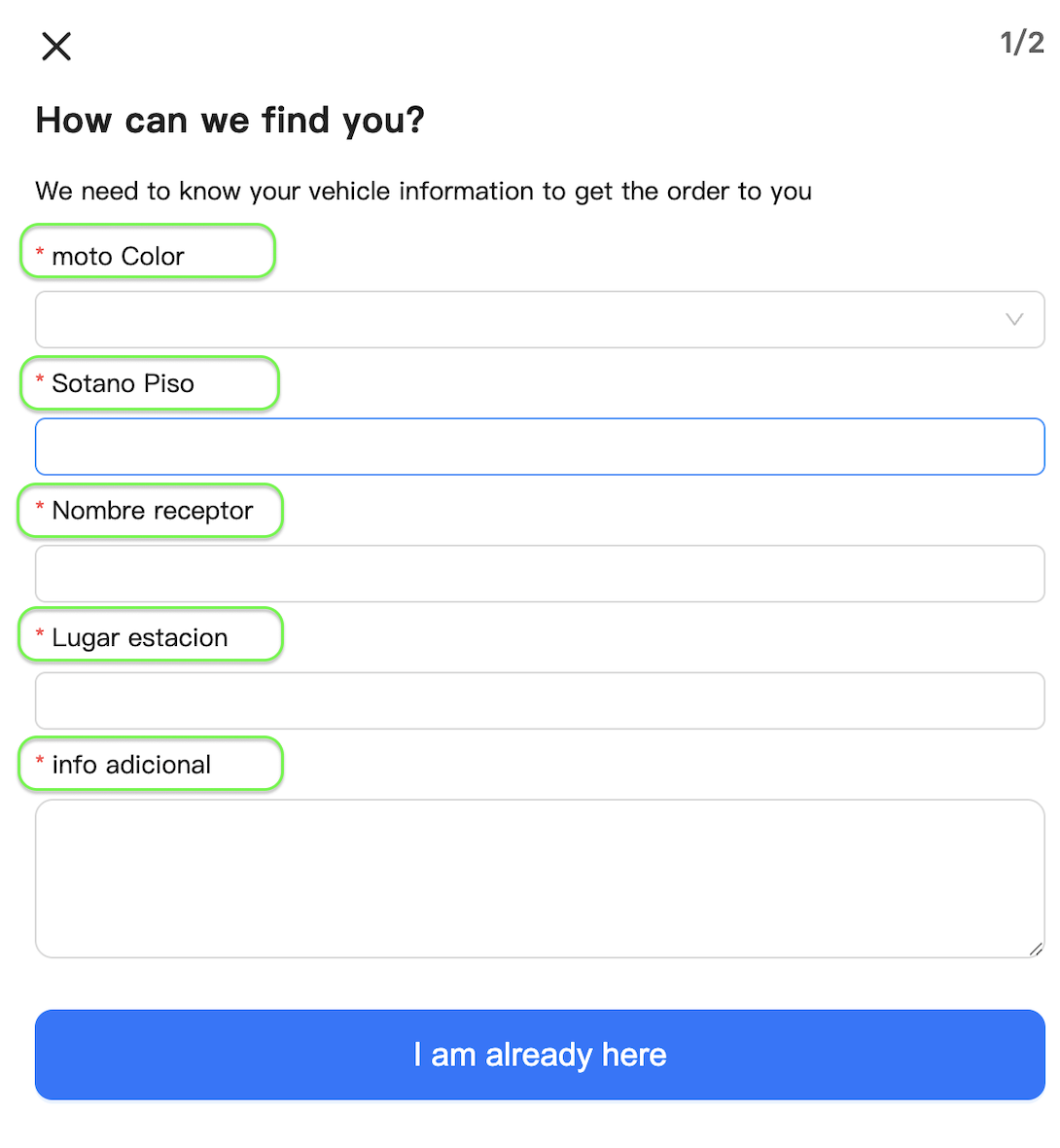
You can change the title of the fields and add the mandatory ones. The only required field is the color of the vehicle. The parameter must be used for each title. Each parameter requires field, required and text.
Below we have a screenshot of what the feature looks like:
Implementation
Available parameters
| Parameters lib | Parameters web | Description |
|---|---|---|
| curbside.fields.Color | curbsideField=color | Parameter used to change the title of the vehicle's color.
|
| curbside.fields.Plate | curbsideField=plate | Parameter used to change the title of the plate number.
|
| curbside.fields.Location | curbsideField=location | Parameter used to change the title of the Parking location.
|
| curbside.fields.Name | curbsideField=name | Parameter used to change the title of the receiver's name.
|
| curbside.fields.Comment | curbsideField=comment | Parameter used to change the title of the additional information.
|
Code
<!DOCTYPE html>
<head>
    <title>LSW v3 Embed</title>
</head>
<body>
    <div id="instaleap-lsw-v3"></div>
</body>

<script src="https://xandar-lsw-v3.instaleap.io/lib/status.js"></script>
<script>
    const params = {
        job: "myJob",
        token: "myToken",
        container: "#instaleap-lsw-v3",
        curbside:{
            fields:[
              { field: "color",label:"moto Color",required: true },
              { field: "plate", required: false, label: "Sotano piso" },
              { field: "name", required: false, label: "Nombre receptor" },
              { field: "location", required: false, label: "Lugar estacion" },
              { field: "comment", required: false, label: "info adicional" }
            ]
        }
    }
    window.instaleap.status.render(params)
</script>
</html>https://xandar-lsw-v3.instaleap.io/status?job=myJob&token=myToken&curbsideField=color,true,moto%20Color&curbsideField=plate,true,Sotano%20Piso&curbsideField=name,true,Nombre%20receptor&curbsideField=location,true,Lugar%20estacion&curbsideField=comment,true,info%20adicionalDemo
Updated 11 months ago
Did this page help you?